Saturday, April 10, 2010
The light

Thursday, April 8, 2010
ARDUINO - The Sound Code

The brick consists of a high sensitivity microphone and onboard Low Voltage Audio Power Amplifier. These measure the amplitude of sound in the environment. This data can then be used to start the effects on the screen, so in my case the storm starting on the screen.
The code for this would be very simple, it would just be a matter of telling the Arduino sensor that when the audio level reaches a certain level (eg 10DB so that normal ambient sounds do not effect the game) the animation starts.
I used similar code in my work for idat209 (see my post on light sensors).
The cost for the device would be around £20 and it would come with the necessary code to do it. Sadly it would take over a week to come as it is from Japan.
I have written up a code for a device to display sound levels with Arduino but not to do anything with them, this would be the part I'd need with the device.
The code would be similar to this...
/* ****************************************************
Arduino Code
**************************************************** */
int analogValue;
int val;
void setup()
{
// start serial port at 9600 bps:
Serial.begin(9600);
}
void loop()
{
// read analog input
analogValue = analogRead(0);
// send values to processing
Serial.println(analogValue, DEC);
// pause for 10 milliseconds:
delay(10);
}
/* ****************************************************
Processing Code
**************************************************** */
// import the Processing serial library
import processing.serial.*;
// declare a font variable
PFont font48;
int linefeed = 10;
// Linefeed in ASCII
Serial myPort;
// The serial port
// value recieved from the serialport / arduino
int sensorValue;
// mapped value
float sensorValueMap;
// – - – - – - – - – - – - – - – - – - – - – - – - – - – - – - – - – - – - – - – - – Setup
void setup() {
myPort = new Serial(this, Serial.list()[0], 9600);
// read bytes into a buffer until you get a linefeed (ASCII 10):
myPort.bufferUntil(linefeed);
size (800, 600);
background (0);
//smooth();
//load font;
font48 = loadFont(“alask_48.vlw”);
textFont(font48);
}
// – - – - – - – - – - – - – - – - – - – - – - – - – - – - – - – - – - – - – - – - – Serial Event
void serialEvent(Serial myPort) {
// read the serial buffer:
String myString = myPort.readStringUntil(linefeed);
// if you got any bytes other than the linefeed:
if (myString != null) {
myString = trim(myString);
//println(myString);
// split the string at the commas
// and convert the sections into integers:
int sensors[] = int(split(myString, ‘,’));
// print out the values you got:
for (int sensorNum = 0; sensorNum < sensors.length; sensorNum++) {
//print(“Sensor ” + sensorNum + “: ” + sensors[sensorNum] + “\n”);
// sensor
sensorValue = sensors[0];
//sensorValueSmooth = sensors[1];
}
}
}
// – - – - – - – - – - – - – - – - – - – - – - – - – - – - – - – - – - – - – - – - – Draw a DB level viewer
void draw() {
// set the black background
background(0);
// run the displayText() function
displayText();
// map the received values
sensorValueMap = map(sensorValue, 0, 1024, 0, 800);
// draw a rectangle based on the variable sensorValueMap
rect (0, 100, width, sensorValueMap);
}
// – - – - – - – - – - – - – - – - – - – - – - – - – - – - – - – - – - – - – - – - – Display Text
void displayText() {
text(“Sensor Value”, 20, 80);
text(sensorValue, 450, 80);
}
// – - – - – - – - – - – - – - – - – - – - – - – - – - – - – - – - – - – - – - – - – Save image
void keyPressed(){
if(key==’s’)
saveFrame(“sound-######.png”);
}
//------------ end of code
Thursday, April 1, 2010
Non Arduino Insperations
This interactive video based on the game Team Fortress 2, the user must guide the "heavy" through the level to gain the intel.
Similar to the TF2 game but with real people and time travel!
Subservient Chicken
The Subservient Chicken is an advertising program created to promote international fast food restaurant chain Burger King's TenderCrisp chicken sandwich and their "Have it Your Way" campaign. Created for the Miami-based advertising firm Crispin Porter + Bogusky (abbreviated to CP+B) by The Barbarian Group, the program featured a viral marketing website, television and print campaigns and a one time pay-per-view program. The program was similar to other marketing campaigns created by CP+B for Burger King, including the Coq Roq, Ugoff, and Sith Sense.
These are weather games from the BBC website, they aren't really like my weather game but I took a few ideas from here and I doubt there will be many games like my idea anyway.
Stormtroopers
WeatherMap Game
Sunday, March 28, 2010
I had a look around the internet for some cool Arduino projects and the best place I've found for some unique applications is YouTube! Below are some Youtube videos showing the capabilities of Arduino, I hope to use these as inspiration for my project.
Here's a good explanation of Arduino...
Some pretty cool Arduino examples
Arduino EMF Detector
This project, found on YouTube shows how to turn an Arduino micro-controller into sensor of invisible electromagnetic fields using simple wire, a resistor, and an LED.
Aaron ALAI's EMF detector project is awesomely simple to make and fun to use. An upgraded version can be built using an LED bar-graph for more 'meter-like' functionality.
This project is really really cool and would be a great way for someone to find where they are wasting electricity in their house in a fun and easy way. This doesn't really relate to our Stonehouse project but goes to show the possibilities of Arduino are really wide ranging.
I might even give this a go in my own time when the project is completed!
The Code...
As you can see the code is really simple to do as well, showing how accessable arduino is to anyone with a little bit of knowledge... compared to say... JAVA! -.-
EMF Detector Averaging Code
// Aaron ALAI EMF Detector May 28th 2009 VERSION 1.1
// aaronalai1@gmail.com
// contains code for averaging sensor data
#define sample 300 //this is how many samples the device takes per reading
//more information for #define http://arduino.cc/en/Reference/Define
int inPin = 5; //analog 5
float val; //where to store info from analog 5
int pin11 = 11; //output of red led
int array1[sample]; //creates an array with number of elements equal to "sample"
//more information about arrays http://arduino.cc/en/Reference/Array
unsigned long averaging; //the program uses this variable to store the sum of each array it makes
void setup() {
Serial.begin(9600);
}
void loop() {
for(int i = 0; i < averaging =" averaging" val =" averaging" val =" constrain(val," val =" map(val," averaging =" 0;" inpin =" 5;" pin11 =" 11;" i =" 0;" averaging =" averaging" val =" averaging" val =" constrain(val," val =" map(val," averaging =" 0;" inpin =" 5;" pin11 =" 11;" i =" 0;" averaging =" averaging" val =" averaging" val =" constrain(val," val =" map(val," averaging =" 0;"
Instead of chaining multiple guitar effects in search of a new sound, the maker of this video decided to mod just one. Using an Arduino microcontroller board + digi-pot chip, he was able to add a variable gating effect to a fuzz pedal.
The Code...
http://makezine.googlecode.com/files/WavePot-090819a.zip
Helicopter Game
This helicopter game is made using arduino, and is similar to the popular copter game online, the refresh rate is a bit slow but the game is simple and engaging.
The Code
This code is more in-depth but is do-able
#include
#include "Arial14.h"
#include "SystemFont5x7.h"
/**
* Helicopter Game v0.1
* By Dave de Fijter
* Free to use and abuse :)
*
* Uses the ks0108 library from the arduino playground:
* http://www.arduino.cc/playground/Code/GLCDks0108
*/
int position = 5; // Initial y-position of the helicopter
unsigned int screenwidth = 128; // The width of the screen in pixels (duh)
unsigned int screenheight = 64; // The height of the screen in pixels (duh)
unsigned int playerwidth = 10; // The width of the helicopter sprite
unsigned int playerheight = 5; // The height of the helicopter sprite
unsigned int max_position; // The maximum y-position of the helicopter
unsigned int buttonPin = 12; // The arduino pin number of the play-button
unsigned long xpos = 1; // The x-position of the helicopter ;)
unsigned int iters = 0; // Block iterations, also represents your score
boolean running = true; // Flag that marks if the game is running or not
unsigned int ry; // The y location of the current block to avoid
unsigned int minblock = 19; // Minimum size
unsigned int blocksize = 19; // The startsize of the blocks
unsigned int maxblock = 30; // The maximum size of a block; increase for more difficulty
void setup() {
// Reset the defaults because we wan't te reset the game after a game over
running = true;
xpos = 1;
iters = 0;
position = 5;
blocksize = 19;
// If the button is hold invert the screen, otherwise play it like it's normal
pinMode(buttonPin, INPUT);
if(digitalRead(buttonPin) == LOW) {
GLCD.Init(INVERTED);
} else {
GLCD.Init(NON_INVERTED);
}
GLCD.ClearScreen();
// Calculate the maximum y position of the helicopter
max_position = screenheight - playerheight - 2;
// Show the introduction screen
intro();
// Seed the random generator from the unused analog 5 input (noise)
randomSeed(analogRead(5));
}
void intro() {
// Draw the introtext and wait for a second before starting the game
GLCD.ClearScreen();
GLCD.SelectFont(Arial_14);
GLCD.GotoXY(40, 26);
GLCD.Puts("HeliGame");
delay(1000);
GLCD.ClearScreen();
DrawScene();
}
void DrawPlayer(int y) {
// Remove the last helicopter and draw a new one on the given y position :)
GLCD.FillRect(0, position, 10, 5, WHITE); // Clear the last heli
GLCD.DrawLine(1, y, 8, y, BLACK); // X,Y,X,Y, BLACK
if(xpos % 3 == 0) {
GLCD.SetDot(2, y, WHITE);
GLCD.SetDot(4, y, WHITE);
GLCD.SetDot(6, y, WHITE);
}
GLCD.SetDot(5, y + 1, BLACK);
GLCD.SetDot(1, y + 2, BLACK);
GLCD.DrawLine(4, y + 2, 7, y + 2, BLACK);
GLCD.DrawLine(1, y + 3, 4, y + 3, BLACK);
GLCD.SetDot(8, y + 3, BLACK);
GLCD.DrawLine(4, y + 4, 7, y + 4, BLACK);
position = y;
}
void GameOver() {
// Shop this screen when it's a "Game Over"
// Delay for a sec after that so the reset won't get triggered by accident
// After that second the game can be reset
// Hold the button for a while for "night" modus ;)
GLCD.ClearScreen();
delay(10);
GLCD.SelectFont(Arial_14);
GLCD.GotoXY(32, 26);
GLCD.Puts("Game Over");
GLCD.SelectFont(System5x7);
GLCD.GotoXY(58, 40);
GLCD.PrintNumber(iters);
running = false;
delay(1000);
}
void Blocks(int x) {
// Draw the blocks to avoid;
// Sorry, only one at a time ;)
if(x / screenwidth > 0) {
if(x % screenwidth == 0) {
//GLCD.ClearScreen();
GLCD.FillRect(0, 1, screenwidth -1, screenheight - 3, WHITE);
ry = random(1, screenheight - (blocksize + 2));
iters++;
}
int rt = screenwidth - (x % screenwidth) - 10;
int rto = screenwidth - (xpos % screenwidth) - 10;
if(rto >= 0) {
GLCD.FillRect(rto, ry, 9, blocksize, WHITE);
}
if(rt >= 0) {
GLCD.FillRect(rt, ry, 9, blocksize, BLACK);
}
if(rt <>= ry && position <= (ry + blocksize)) { // collide GameOver(); } } } xpos = x; } void DrawScene() { // Draw the initial scenery GLCD.DrawLine(0, 0, screenwidth - 1, 0, BLACK); GLCD.DrawLine(0, screenheight - 1, screenwidth - 1, screenheight - 1, BLACK); GLCD.SelectFont(System5x7); } void loop() { // Game code; run the main loop if the game is running; // Otherwise check the button state for a game reset if(running) { if(digitalRead(buttonPin) == LOW) { // Go Up DrawPlayer(position - 1); } else { // Go Down DrawPlayer(position + 1); } GLCD.FillRect(100, 4, 26, 7, WHITE); GLCD.GotoXY(100, 4); GLCD.PrintNumber(iters); Blocks(xpos + 1); // Check for status if(position <> max_position) {
GameOver();
}
int del = 10;
if(iters >= 6 ) {
del = 10;
if(blocksize <= maxblock) {
blocksize = minblock + (iters - 5);
}
} else {
del = 40 - (iters * 5);
}
delay(del);
} else {
if(digitalRead(buttonPin) == LOW) {
delay(200);
setup();
}
}
}
Wednesday, March 24, 2010
More interaction methods
Another way I have found and experimented with is Keyboard Interaction, we used this technique a lot in our SOFT232 module but this was with Java, I am looking into using flash for it in this project like in the link above.
Monday, March 22, 2010
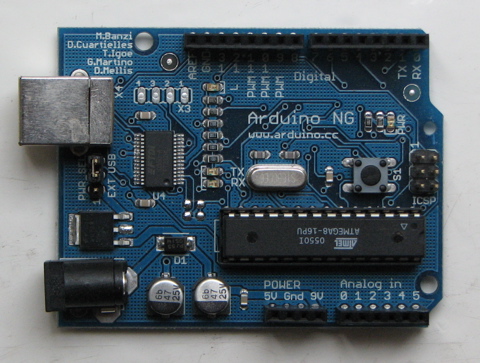
Heres some info on Arduino, its definitely the best way to go about doing this project as its so broad and the simple code is great for me, because I suck at coding! Arduino is an open-source electronics prototyping platform based on flexible, easy-to-use hardware and software. It's intended for artists, designers, hobbyists, and anyone interested in creating interactive objects or environments.
Arduino can sense the environment by receiving input from a variety of sensors and can affect its surroundings by controlling lights, motors, and other actuators. The microcontroller on the board is programmed using the Arduino programming language (based on Wiring) and the Arduino development environment (based on Processing). Arduino projects can be stand-alone or they can communicate with software on running on a computer (e.g. Flash, Processing, MaxMSP).
The boards can be built by hand or purchased preassembled; the software can be downloaded for free. The hardware reference designs (CAD files) are available under an open-source license, you are free to adapt them to your needs. Arduino received an Honorary Mention in the Digital Communities section of the 2006 Ars Electronica Prix. The Arduino team is: Massimo Banzi, David Cuartielles, Tom Igoe, Gianluca Martino, and David Mellis." - Arduino Developers
After using Arduino in idat209 I feel this technology would be by far the best way to attempt completion of this project, I've had a lot of ideas for our visual aspects but not how to code it up yet but with Arduino you can find a lot of open-source code which is easy to adapt to your project so this hopefully won't be a problem. The problem with using Arduino is the cost, I am going to look at ways to get around this at the moment, one idea is to do the theory for the whole project but to just produce a small part of it.
Another way would be to mock up the whole thing with all the code to show I did do the work but I don't have the funds!
Thursday, March 18, 2010
OK so I've now got a more concise idea for my interactive media project. I've developed some good ideas for methods of interacting with a computer, other than the usual ways we use everyday, from my other modules, previous work I have done, browsing the internet as well as checking out some new media publications in the library and in magazines too.
My project is going to be a game for children about the weather, which can be interacted with in many ways to create different weather effects on a screen, these in turn will effect the landscape in the animation.Each element will have a different way to interact which I feel reflects how children would persevere each element for example the sun will be controlled by a light sensor, so when the child turns a light on using a specially designed button the sun will come onto the screen.

For the wind I will use a air sensor which the child will blow on to create a tornado.
 Another example is a temperature sensor for snow, I'm not sure how I'd make it smaller but if I found a way I think this would be a good way to make snow.
 For water the only idea I have is gesture recognition, which the user can draw a cloud to create rain.
 I doubt I have the time to build a properly working project and I certainly don't have the funds to build it, but I am going to build up as many of the elements as I can, and will make a demo to show how it works.
Wednesday, March 17, 2010
If I had more time I could link multiple installation so people can "vote" for different decisions similar to a democratic vote.
 Motion Capture
http://en.wikipedia.org/wiki/Global_warming_controversy
Interactive light installation from The Latest Artists on Vimeo.
This is a video of an installation controlled by the movement of people in the gallery it inhabits: motion sensors use the number and frequency of people in various parts of the space to control the colour and speed of the installation.
SpyToy uses onscreen motion detection, I want to so something very similar with specific areas onscreen that the user must "touch". I am going to try and find a similar code to this.
Another method for using motion capture would be for characters to appear onscreen for every person in the room, and leave at the same time as the person. This could be linked to RSS feeds from the BBC News website and the characters represent whatever is in the news at the time, to do this I would have the program recognize keywords such as 'war, Iraq, Afghanistan, solider' which would bring up a solider character or 'global warming, green, co2, carbon' to bring up a hippie character!
Saturday, March 13, 2010
Similar Interactive Installations
night lights from thesystemis on Vimeo.
Audience - rAndom International from Chris O'Shea on Vimeo.
This, slightly random, installation is by ex idat student Chris O'Shea, The project consists of a bunch of small mirrors each of the mirrors moves its as if looking like a human to show different emotional states. The mirrors interact with one and other until interrupted by person walking into the middle of the group. When someone walks into the middle all the mirrors turn towards the person in sync, so the person can see their reflection all around them. After a while they will return to talking amongst one and other until interrupted again.
This installation shows an unusual way the audience can interact with a project, the project seems pretty simple, just using motion sensors to detect when someone enters the perimeter, and instead of having a somewhat intelligent system like this, i could just use pre set "emotions" which the objects switch between.
Thursday, March 11, 2010
The Idea Part II
I do however want to try to keep it simple as I have a lot of other deadlines around the same time.
I am going to look into different ways to make an installation as simple as possible but still creative and new, I would probably set up the installation in room 213 as there is room to do it and I wouldn't have to go through a long process of applying for a place to host the installation.
I am thinking of making a piece with a political message of some form, possibly about CO2 or something similar, but I am going to look around at different influences for my project.
Examples of other Interactive work

On our visit to New York we visited an Interactive installation in the "Arts Building 529 20th Street".

There were two similar installations, the first was formed of wooden blocks which moved to a different angle to appear as a different colour when someone stood on a gravel track in front of the sheet of blocks, the blocks would form a "shadow" of the person and move with their movements.

The installation appeared to use a motion sensing camera and many chips, with 1 chip seeming to control the movement of around 4 or 6 of the wooden blocks.

the mirrors pointed towards red blue and green lights which in my opinion had a much more interesting effect to the other installation as it gave a sort of disco effect.
 The installation seemed to work in the same way as the other installation but seemed to be a lot more responsive, this could be due to the use of colours instead of shadow.
Saturday, February 27, 2010
My Idea
My plan is to make an interactive film, which is playable online, I aim to make it different to other interactive games as the player will have a much wider range of choices, for example the user will be able to chose certain elements in a room, by clicking them to examine them, sort of like a point and click game with real people.
Broken Sword
I have got the idea for this game from playing games such as Broken Sword and also from researching interactive film for the essay we had to make last term I found that the interactive films were a bit slow and became boring.
I wanted to merge the two fields to make an interactive film/game.
Late Fragment
http://www.crimeface.net/interactive/inter.html
There are of course problems that could come about using this process, the main one being the amount of times I would have to film. I have therefore chosen not to use actors in the piece as I feel that it would be a lot of work to keep the continuity and flow using actors, whereas objects can't change of their own accord.
My first idea is to film a cupboard full of objects and have a bowl which all the ingredients can be put in to. I would then have to film every combination of the objects. I would therefore need to limit the number of objects to around 10 as there would still be a large amount of combinations.